
 DE
DE  EN
EN Solutions · Maintenance windows
Maintenance Windows for Endpoint Power Management
Auto Shutdown Manager by EnviProt helps IT teams keep endpoints available for patching, scans and admin work, then return them safely to policy afterwards. Where SCCM/MECM maintenance plans are used, ASDM can synchronize scheduled maintenance windows into the power-management workflow so the right devices are awake, protected during the window and shut down again when the work is done.
The maintenance gap
Patch windows fail when endpoint availability is unmanaged
Deployment tools can schedule updates, scans and scripts. The operational problem is simpler and more stubborn: the right PCs must be awake at the right time, users and running tasks must not be interrupted, and machines should not stay powered all night after maintenance has finished.
Powered-off endpoints
Night or weekend maintenance can miss PCs that are already shut down, asleep or unreachable across network boundaries.
Wake reliability
Wake-on-LAN becomes more complex across VLANs, subnets and remote sites. A simple magic packet is often not enough in enterprise networks.
User disruption
Automation must not shut down a PC during active work, presentations, remote sessions, backups, scans or other protected tasks.
Always-on fallback
Leaving endpoints powered all night can make maintenance easier, but it wastes energy and creates unnecessary runtime.
Maintenance workflow
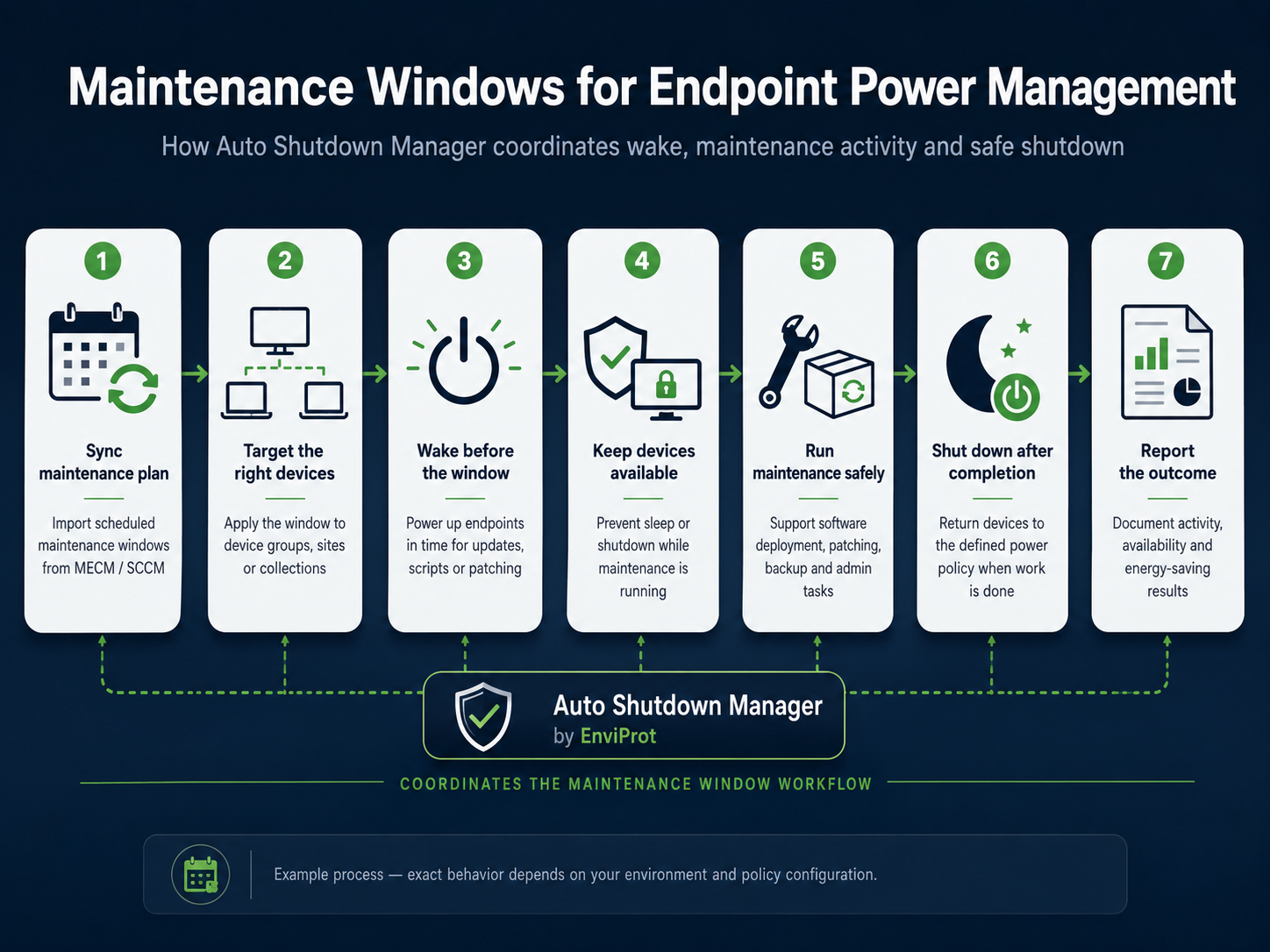
Sync the plan. Wake endpoints. Protect the window. Shut down when done.
ASDM is not a replacement for your deployment platform. It is the endpoint power-management workflow around it: synchronize or define the maintenance plan, prepare the right PCs, keep them reachable, protect exceptions, shut them down again and document the result.
Sync the plan
Import or synchronize scheduled maintenance windows from SCCM/MECM where configured, or define ASDM maintenance plans directly.
Target devices
Apply the window to managed clients, departments, sites or collections instead of treating every PC the same way.
Wake before work
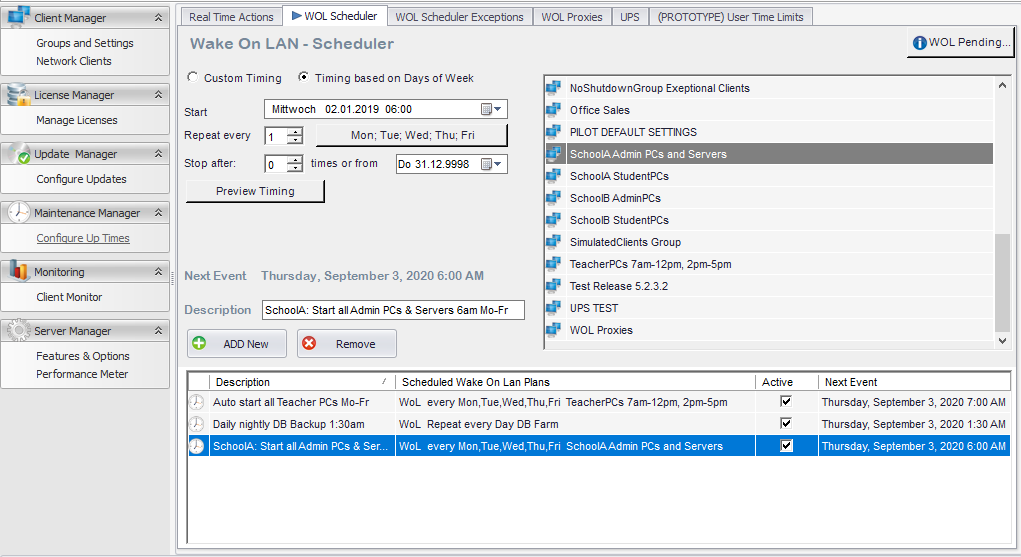
Use scheduled wake-up and Wake-on-LAN options so endpoints are available before patching, inventory, scans or support actions start.
Keep devices available
SCCM/MECM, Intune, GPO, scripts, antivirus, inventory or backup tools can do their job while the PC is intentionally online.
Respect exceptions
Warnings, time rules, idle checks and maintenance controls help avoid false shutdowns while users or protected tasks are still active.
Shut down and report
After the window, endpoints can return to a configured power state and reporting can document availability and savings results.
When SCCM / MECM is the source plan
IT can keep defining deployment or maintenance timing in Microsoft tooling. Where the integration is configured, ASDM can synchronize those scheduled windows and turn them into a wake-and-shutdown process around the actual deployment work.
What ASDM coordinates around it
Wake timing, endpoint availability, protected exceptions, controlled post-window shutdown and reporting are handled centrally, so teams do not need to rely on always-on fallback or scattered scripts.
Workflow and product proof
Maintenance windows need an operational wake-and-shutdown process
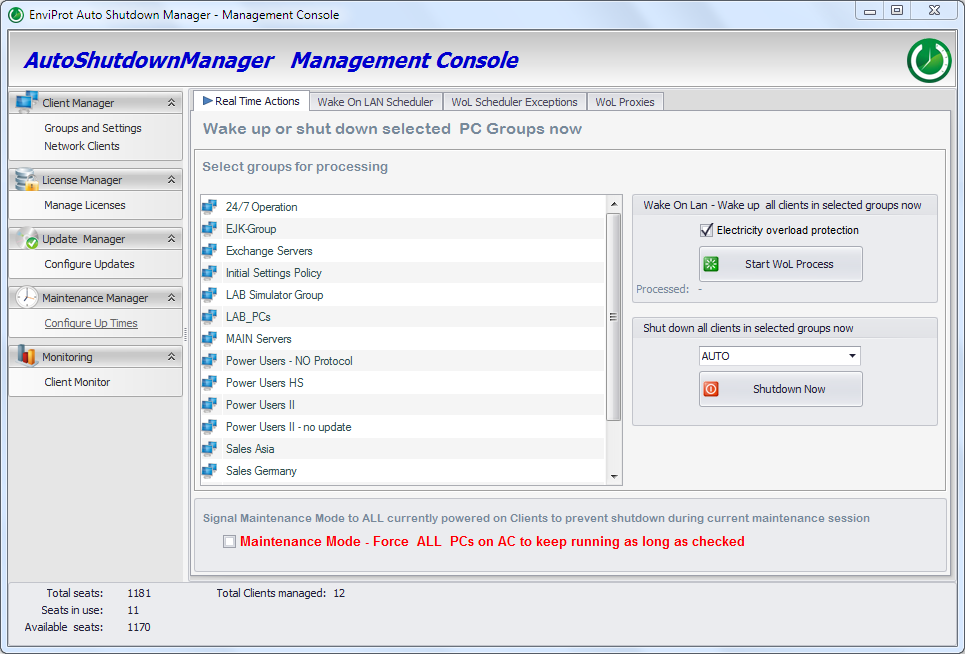
The workflow starts with the maintenance plan, not with a generic power policy. Auto Shutdown Manager adds scheduled wake, availability protection, controlled shutdown and reporting around the tools that perform the actual maintenance work.

Microsoft endpoint management fit
ASDM complements SCCM, MECM, Intune and GPO
Deployment platforms are good at deploying software, updates and policies. ASDM focuses on the power and wake layer that surrounds those deployments, including synchronizing scheduled maintenance windows from SCCM/MECM where this integration is configured.
Align with SCCM/MECM schedules
Keep endpoint availability aligned with the planned maintenance window.
SCCM/MECM can schedule deployments and maintenance windows, but endpoint power state remains a separate operational dependency: devices may be off, asleep, unreachable, or left running after the window.
ASDM synchronizes configured SCCM/MECM maintenance windows into the power-management workflow, wakes targeted endpoints before the window, keeps them available during maintenance, and returns them to policy afterwards.
Run updates at night
Use off-hours for patching without creating uncontrolled overnight runtime.
Off-hours maintenance often leads to an always-on fallback because basic policies and scripts do not reliably prepare, protect, and shut down only the right endpoints after the work is complete.
ASDM schedules wake-up before the window, keeps endpoints available while deployment tools run, and powers them down again after completion where policy, hardware, and current conditions allow.
Reach PCs across sites
Keep distributed devices reachable across real enterprise network conditions.
Wake-on-LAN across VLANs, subnets, routed networks, and remote sites is fragile. Basic magic packets often stop at network boundaries or require custom handling.
ASDM provides enterprise wake patterns with central scheduling and WOL Proxy or Wake-on-WAN scenarios where supported, reducing manual wake work and script sprawl.
Avoid user disruption
Keep maintenance practical without interrupting real work or protected tasks.
Basic shutdown rules or scripts may not know whether a user, backup, scan, presentation, or remote session is still active. False shutdowns create helpdesk friction.
ASDM applies policies, idle checks, warnings, exclusions, and maintenance controls before power actions, making automation more predictable and less disruptive.
Reduce always-on runtime
Avoid leaving endpoints online longer than the maintenance window requires.
If maintenance success depends on “keep everything on,” energy cost and avoidable runtime accumulate, and savings are difficult to prove to management or procurement.
ASDM returns endpoints to a controlled power state, records availability and savings evidence, and supports ROI reporting for validating the business case.
Controls for IT admins
Make maintenance predictable without leaving every PC on
The goal is not aggressive shutdown. The goal is predictable endpoint availability with controlled power states before and after planned work.
Groups and scopes
Apply synchronized or manually defined schedules by groups, sites, departments or maintenance collections so each scenario can use the right policy.
Scheduled wake
Wake endpoints before the imported or defined window and combine scheduled wake with WOL infrastructure where conditions allow.
Maintenance protection
Use time rules, maintenance mode and activity checks to avoid interfering with real work or protected operations.
Post-window shutdown
Return endpoints to shutdown, standby or hibernation instead of leaving them online after the update window.
Scripts and remote actions
Run configured scripts or actions before shutdown or after wake-up where policy allows, and centrally wake, restart, log off, hibernate, standby or shut down selected clients or groups.
Reporting
Use reports and savings views to validate runtime reduction and support the business case for controlled endpoint energy management.
Pilot path
Start with one maintenance group, then scale
A practical rollout can begin with a limited group of managed PCs, a defined maintenance window and a measurable before/after result.
Select a controlled group
Choose a department, lab, site or test collection where maintenance behavior can be measured safely.
Test wake and shutdown
Verify Wake-on-LAN, user warnings, exclusion rules and post-maintenance shutdown in your network and hardware environment.
Expand by policy
Roll out to more groups once availability, disruption protection and reporting meet your operational requirements.
FAQ
Maintenance windows and endpoint power management
Does ASDM replace SCCM, MECM or Intune?
No. Auto Shutdown Manager complements Microsoft endpoint management. SCCM, MECM and Intune can deploy updates and policies; ASDM focuses on the wake, shutdown, exception handling and reporting workflow around endpoint availability. Where configured, ASDM can also synchronize scheduled maintenance windows from SCCM/MECM into that workflow.
Can ASDM wake PCs before a patch window?
Yes, ASDM supports scheduled wake and Wake-on-LAN scenarios. Success depends on hardware, firmware, network configuration and routing conditions, so the setup should be validated in the target environment.
What happens if a user is still working?
Policies can include warnings, cancellation behavior, idle checks, time rules and exclusions. The intention is controlled power management, not blind forced shutdown.
Can PCs shut down automatically after maintenance?
Yes, ASDM can return endpoints to a configured power state after the maintenance period when policy and current conditions allow it.
Is this useful if we already use GPO or scripts?
Yes. GPO and scripts can solve parts of power management. ASDM is intended to reduce script sprawl and provide a central, repeatable process for wake, protection, shutdown and reporting.
Shut down safely. Wake reliably. Prove the savings.
Test maintenance-window power control in your own environment
Use the 45-day Enterprise Trial to validate scheduled wake, user protection, post-maintenance shutdown and reporting with your hardware, network and deployment tools.