 DE
DE  EN
EN 
Support · FAQ
Prevent PCs from shutting down during core business hours
Use Auto Shutdown Manager (ASDM) Time Rules to keep PCs available during working hours, begin idle analysis after the protected period, and add a daily final shutdown attempt without unexpectedly interrupting active users.
Quick answer
Protect the working window, then re-enable the normal idle policy.
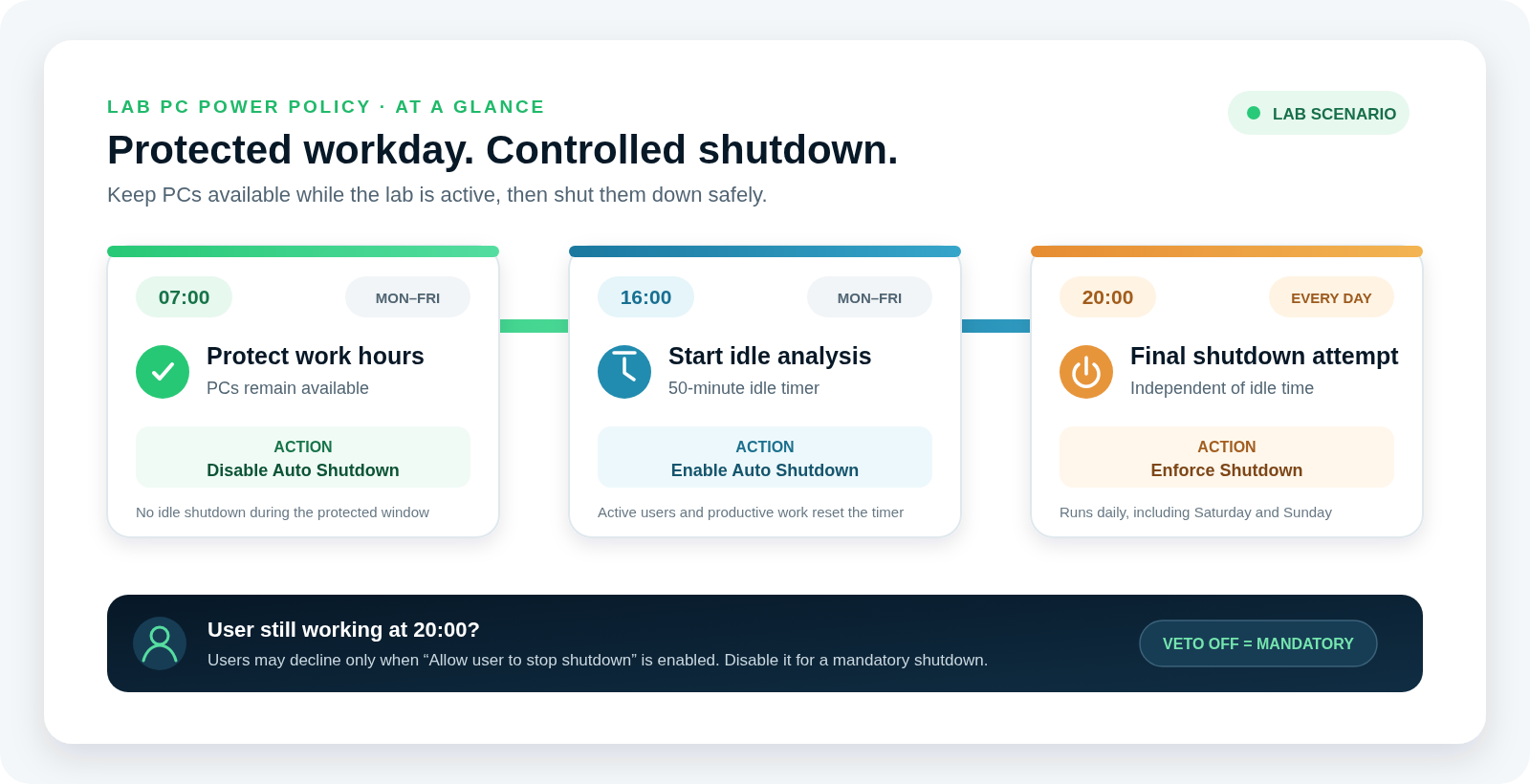
At minimum, create one rule that disables Auto Shutdown at the beginning of the protected period and another that enables it afterward. The complete example below also defines the idle timer, shutdown mode, user decision and a daily Enforce Shutdown action.
07:00–16:00 · protected
Monday to Friday, Auto Shutdown is disabled so the lab PCs remain available throughout the required operating window.
After 16:00 · idle analysis
Auto Shutdown is enabled again. A PC is shut down only after 50 minutes without configured user or productive system activity.
Complete worked example
Laboratory PCs available on weekdays and evaluated after 16:00
The target group must remain running from Monday to Friday between 07:00 and 16:00. After 16:00, ASDM begins idle analysis and shuts a PC down after no more than 50 minutes of configured inactivity. At 20:00 every day, ASDM starts an additional enforced shutdown attempt. If the policy allows users to stop the shutdown, somebody still working can reject that attempt and continue.
Step 1 · Select the policy group
Open the group whose clients should receive the configuration
- Open the ASDM Management Console.
- Select Groups & Settings.
- Select the PC group to which the settings should apply.
Use a clear group description so the intended wake, protected-time, idle and maintenance behavior remains understandable to other administrators.
Step 2 · Configure idle and user protection
Set the 50-minute timer and define which activity resets it
- Under Details, open Timer.
- Ensure the Idle Shutdown Timer is enabled.
- Set the timer value to 50 minutes.
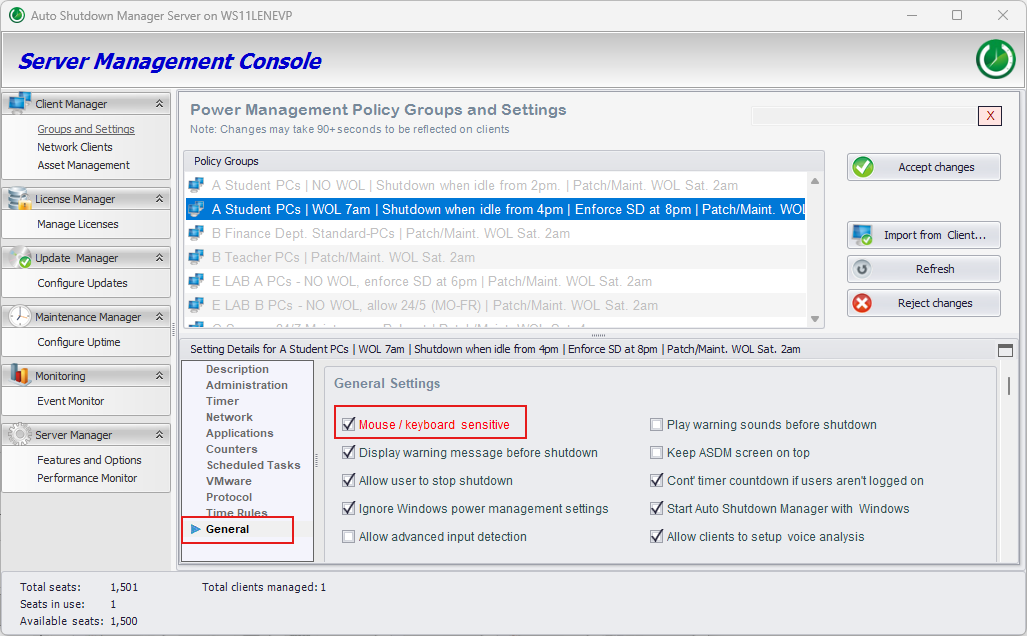
- Open General and enable Mouse / keyboard sensitive if direct user input should reset the timer.
- Enable Allow user to stop shutdown if users may reject the scheduled 20:00 shutdown attempt.
The idle decision can also monitor applications, network traffic, process I/O, CPU or disk activity, scheduled tasks, backup or antivirus processes, logged-on users and other productive signals. Configure only the signals relevant to the group and validate them before broad deployment.
Step 3 · Choose the shutdown mode
Define what happens when the idle timer expires
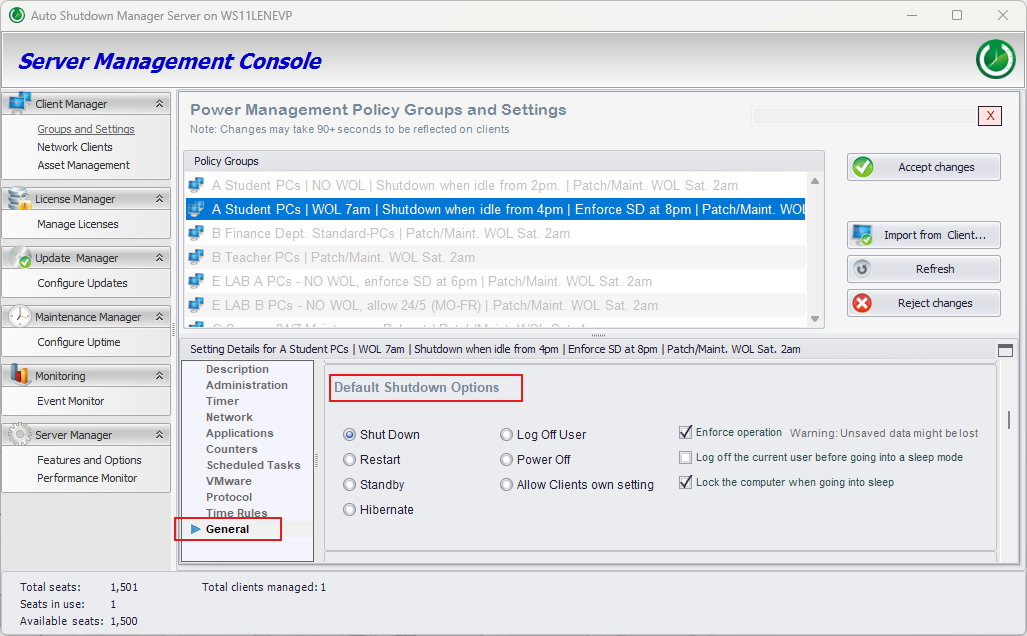
In Details → General, scroll to Default Shutdown Options. Select the required action—for this example, Shut Down—and review the accompanying options for the target environment.
The default mode can itself be changed by Time Rules. For example, a daytime policy could use Standby while the evening policy uses a full shutdown.
Step 4 · Create the Time Rules
Add two weekday rules and one daily enforced shutdown attempt
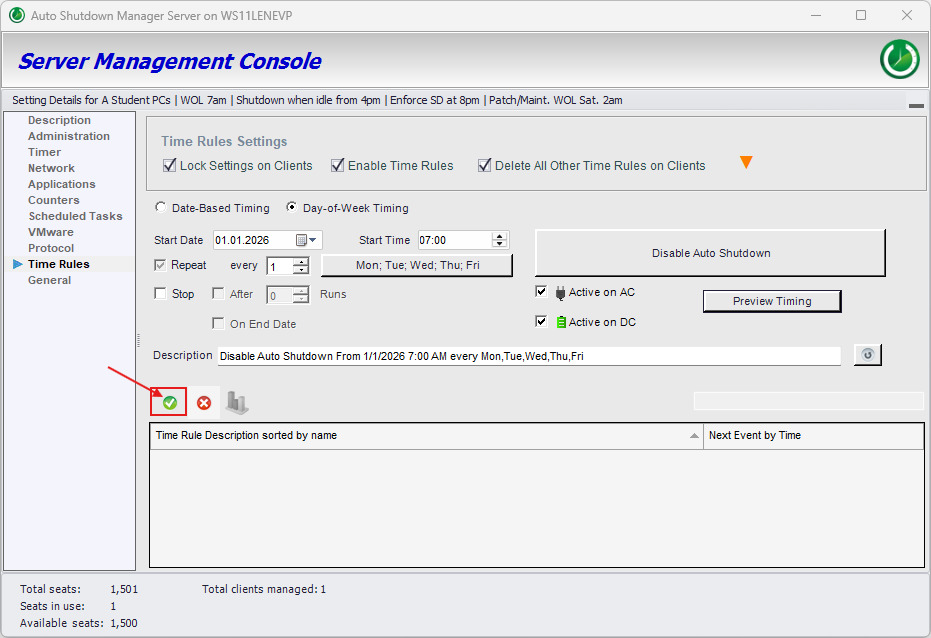
Rule 1 · Disable at 07:00
- Open Time Rules and click the green plus.
- Select Day-of-Week Timing.
- Set the start time to 07:00.
- Select Monday through Friday.
- Choose Disable Auto Shutdown.
- Add the rule with the green check mark.
Rule 2 · Enable at 16:00
- Add another Day-of-Week Timing rule.
- Set the start time to 16:00.
- Select Monday through Friday.
- Choose Enable Auto Shutdown.
- Add the rule with the green check mark.
Rule 3 · Enforce Shutdown at 20:00 every day
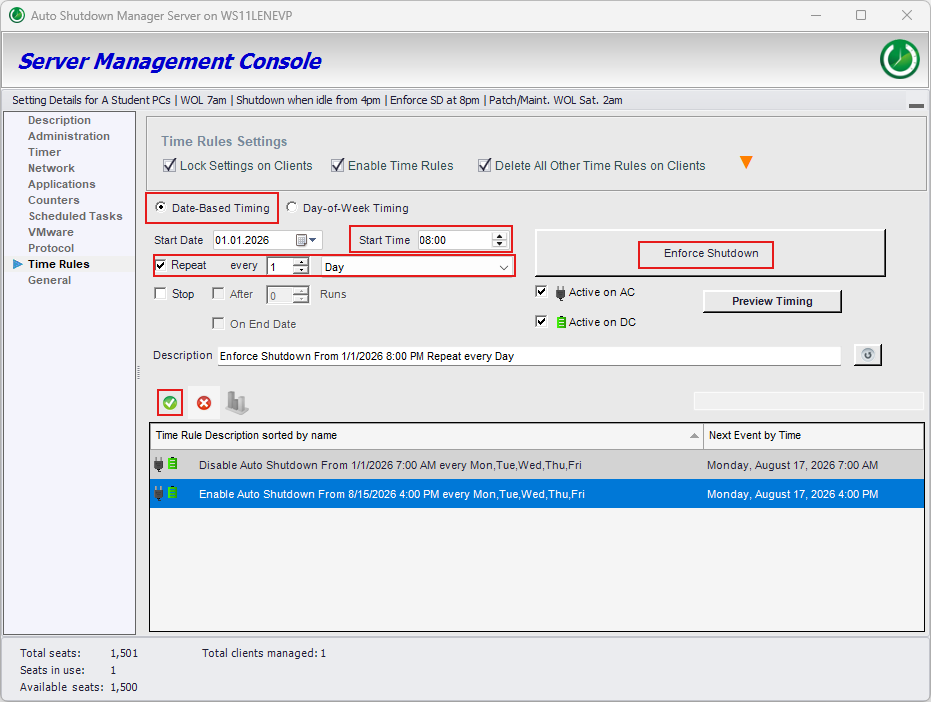
- Add a new rule and select Date-Based Timing.
- Choose the start date and set the start time to 20:00.
- Enable Repeat, set it to every 1 Day.
- Under Action, choose Enforce Shutdown—not Enable Auto Shutdown.
- Add the rule with the green check mark.
This rule intentionally runs every day, including Saturday and Sunday.
Final check
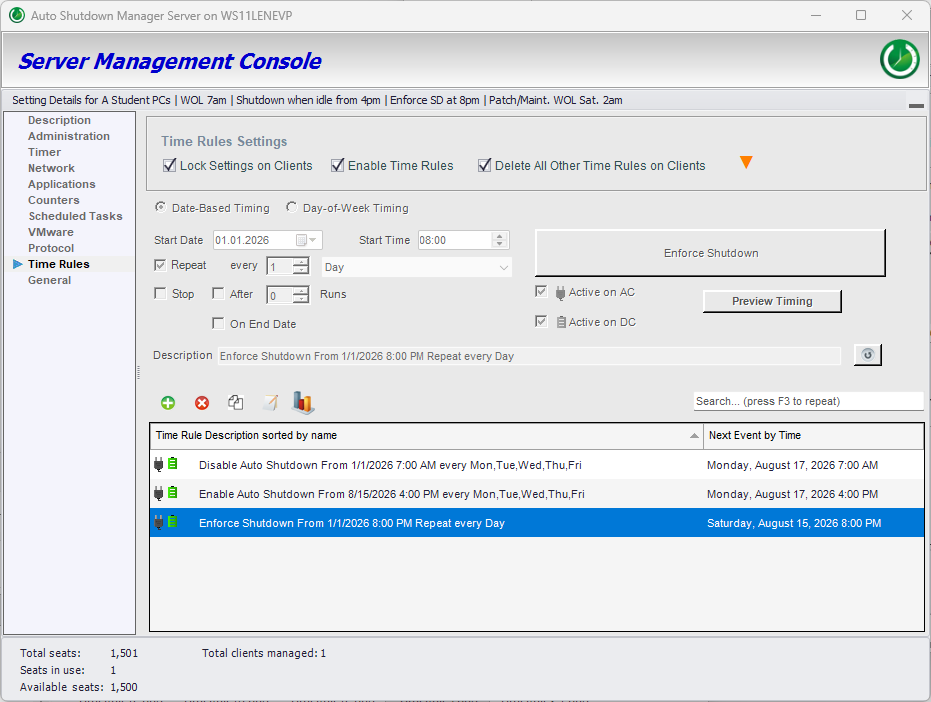
Confirm that all three rules are present
The list should show the weekday Disable rule, the weekday Enable rule and the daily Enforce Shutdown rule.
Step 5 · Save and deploy
Accept the changes and optionally copy them to other policy groups
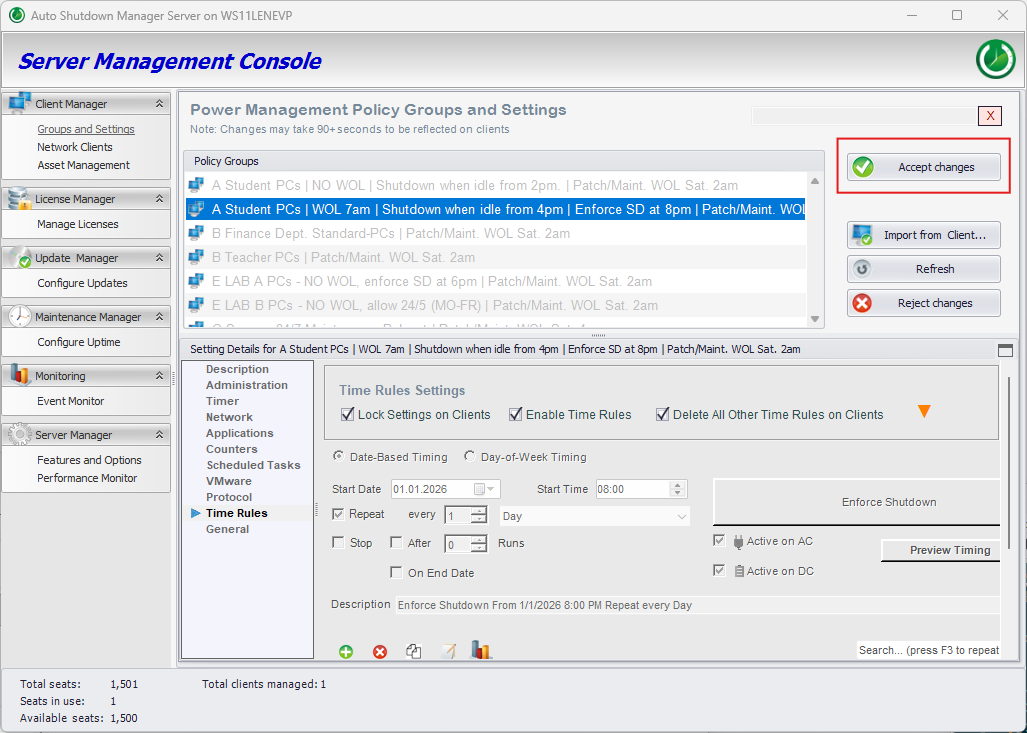
- Click Accept changes.
- If Apply changes to other Policy Groups? appears, choose whether the same configuration should also be saved to additional groups.
Optional reuse
Apply the same settings to other policy groups
When ASDM asks Apply changes to other Policy Groups?, choose Yes only if the same timer, user protection and Time Rules should also be stored in the selected groups.
Protect work before shutdown
Configure document protection for supported applications
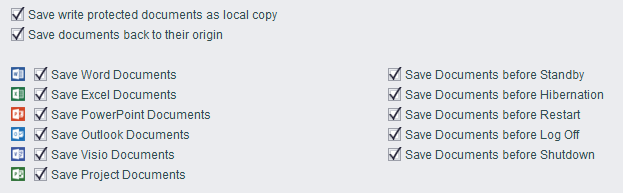
Idle analysis and user cancellation reduce interruptions, but they do not replace document protection. ASDM can save supported open documents before Standby, Hibernate, Restart, Log Off or Shutdown. Configure and test this separately for the applications used in the laboratory.
Learn more about idle detection and protecting documents before shutdown.
FAQ details
What administrators should expect
What happens after 16:00?
The weekday Enable Auto Shutdown rule activates the normal idle policy. The PC shuts down after 50 minutes only if no configured user or productive system activity resets the timer.
What happens at 20:00?
The daily Enforce Shutdown rule starts an additional shutdown attempt independently of the idle timer. It runs every day, including weekends.
Can a user reject the 20:00 shutdown?
Yes, when Allow user to stop shutdown is enabled for the policy. In that configuration, 20:00 is a scheduled shutdown attempt rather than a guarantee that every PC is already off.
What happens to open documents?
ASDM can save supported open documents before shutdown-related actions when document protection is configured. Test the behavior with the applications and document types used in your environment.
The PC still shuts down during the protected period. What should I check?
First confirm that the 07:00 rule uses Disable Auto Shutdown, Monday to Friday are selected, Time Rules are enabled and the settings were deployed to the correct client or policy group.
Then check whether another component is initiating the shutdown, such as an external management tool, antivirus software, Windows Update or another scheduled process. In Client Overview, right-click a client in the affected group, open Timing Details and review Shutdown Source. This identifies what requested the shutdown and helps distinguish an ASDM policy action from an externally enforced shutdown.
Shut down safely. Wake reliably. Prove the savings.
Validate business-hour power rules in your own environment
Use the 45-day Enterprise Trial to test Time Rules, idle analysis, user protection, document saving and after-hours shutdown with your own hardware, applications and policies.