 DE
DE  EN
EN 
EnviProt technical guide
PC Power Management: Definition, Methods, and Requirements
PC power management controls when workplace PCs, notebooks, and comparable endpoints are active, in a low-power state, or shut down. In enterprise environments, the objective is not the shortest possible timer. It is controlled runtime: avoid disruption during defined working hours, identify genuine idle time, protect active work, wake devices for maintenance, and measure the results.
In brief
What is PC power management?
PC power management encompasses the rules, tools, and operating processes organizations use to control endpoint power states. This includes automated shutdown or transitions to low-power states, scheduled or on-demand wake-up, and analysis of actual device runtime.
In professional environments, a policy must reconcile two objectives: reducing avoidable runtime and keeping required devices available. A shutdown is therefore useful only after working hours, user activity, applications, background processes, maintenance, and defined exceptions have been considered.
What it includes
- time- and group-based endpoint policies;
- checks for idle time, user work, and running tasks;
- standby, hibernation, and controlled shutdown;
- scheduled wake-up and Wake-on-LAN;
- runtime, energy, cost, and CO₂ reporting.
What it does not mean here
- CPU frequency or voltage control inside an individual device;
- power-supply, PDU, or data-center energy management;
- building automation or general power distribution;
- a blanket timer that shuts down every PC without further checks.
Why it matters
Benefits of PC power management
PC power management solves a common conflict in IT operations: workplace computers should not remain powered on overnight, at weekends, or during long periods of inactivity when nobody needs them—but they still have to be available for users, remote access, patching, software deployment, and maintenance.
The practical answer is neither to leave every PC running around the clock nor to shut devices down at a fixed time regardless of actual use. Professional PC power management matches runtime to real demand: protect active work, avoid unnecessary operating hours, wake devices when needed, and evaluate the results.
Reduce unnecessary runtime
PCs run only for as long as users or IT processes actually need them. This reduces avoidable electricity consumption outside working hours and the associated energy costs.
Reduce heat output and cooling demand
Running PCs release electrical energy as heat into their surroundings. In air-conditioned offices and technical areas, a lower IT load can therefore also reduce cooling demand.
Reduce electricity-related carbon emissions
When a device fleet consumes less electricity, the emissions associated with that consumption also fall. The actual impact depends on the device mix, previous runtime, and the electricity mix being used.
Maintenance without 24/7 operation
Patching, software deployment, and maintenance do not require workplace PCs to remain powered on every night. Devices can be woken for a maintenance window and returned to the intended power state afterwards.
Reduce the active attack surface
Fully shut-down workplace PCs that are not needed are not running operating systems or services on the network outside their usage periods. This does not replace patch management or EDR, but it reduces the time unnecessary endpoints remain active.
Reduce manual IT effort
IT teams do not have to rely on every user shutting down correctly or switch devices on manually before maintenance. Rules, exceptions, and maintenance periods can be managed centrally.
The real savings potential depends primarily on the number of devices, their power draw, previous runtime, and existing energy-saving policies. Measuring actual runtime first provides the baseline for targeted optimization.
Good to know
Shut down does not necessarily mean unreachable
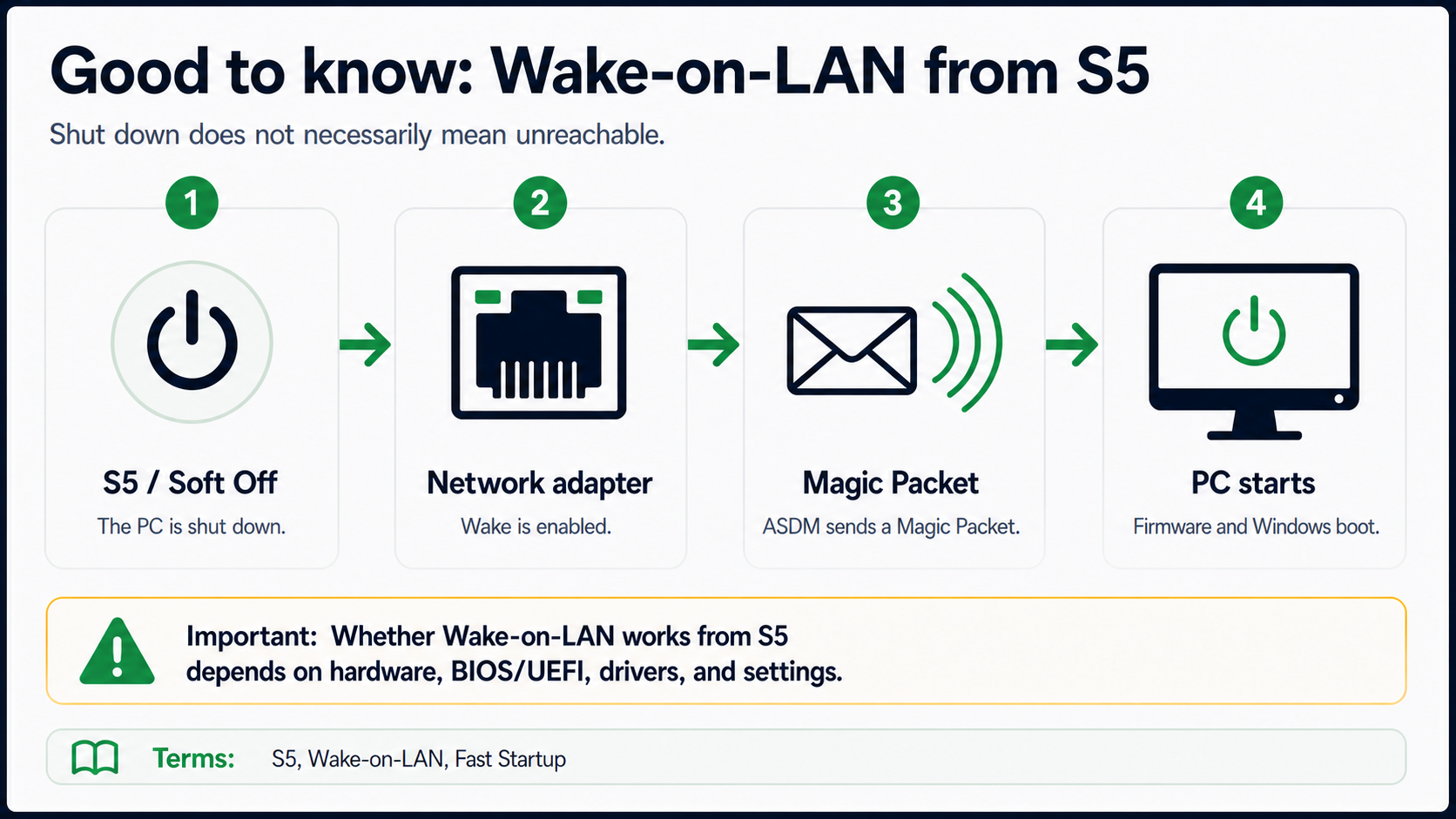
Wake-on-LAN is widely supported by current business PCs, and many fleets already have the technical prerequisites in place. When the function is enabled in BIOS/UEFI and for the network adapter, suitable systems can also be started from the ACPI state G2/S5 (“Soft Off”). This keeps them available for scheduled patching or maintenance without leaving them powered on all night.
Reliable Wake-on-LAN depends on the whole chain: client readiness is just as important as routing. A pilot with representative device models quickly shows which firmware, driver, and power settings are needed in the environment and how Windows Fast Startup affects the result.
ASDM supports both the client and network sides of this process. Supported client-side WOL settings such as Wake on Magic Packet and—where supported—the handling of Windows Fast Startup can be managed centrally. Depending on the network, delivery can use local broadcasts, directed broadcasts, or WOL proxies. This turns an existing hardware capability into a predictable wake-up workflow.
Technical perspective: the exact S5 path remains model- and configuration-dependent. That is why it belongs in the pilot; it is not a reason to default to 24/7 operation.
S5 / Soft Off in the glossary · Enterprise Wake-on-LAN: client readiness and routing
Operational challenge
Why enterprises may need more than a Windows power plan
Windows power options provide a useful technical foundation. Managed environments introduce additional requirements when different user groups, maintenance windows, remote access, or multiple sites must be handled together.
Runtime outside working hours
PCs remain powered on after work although neither users nor scheduled tasks need them. Fixed shutdown times also fail to accommodate shift work, flexible hours, or different departmental rules.
Protect active work reliably
Keyboard and mouse activity alone do not establish whether a device is unused. Applications, file transfers, presentations, remote sessions, or background processes may still be doing productive work.
Make devices predictably available for maintenance
Updates, software distribution, and maintenance tasks require reachable endpoints. Devices must be woken before the maintenance window and returned to the intended policy afterwards.
Keep distributed networks manageable
Local Wake-on-LAN broadcasts normally stop at router and VLAN boundaries. Branch offices and routed networks therefore require a deliberately designed, manageable delivery path.
Windows and hardware
Standby, hibernation, or shutdown?
ACPI distinguishes global power states (G) and the system states (S) within them. The appropriate state depends on the device, its use, required availability, and available wake support. Actual behavior remains dependent on hardware, firmware, drivers, and Windows configuration.
| ACPI state | Technical meaning | Operational use |
|---|---|---|
| G0 / S0 – Working | The computer is operating; processor, memory, and devices are ready for use. | The system remains in S0 even when the display is off. “Display off” is not a separate S-state. |
| G0 / S0 Low Power Idle – Modern Standby | The system remains in S0 but transitions dynamically between active and low-power phases. | Modern Standby devices do not also use the classic S1-to-S3 sleep model. Network and background activity depend on the platform and policy. |
| G1 / S1 – light sleep state | Processor and system-bus clocks are stopped while system context is retained. | Fast resume, but rarely implemented as a regular Windows sleep state today. |
| G1 / S2 – deeper sleep state | Processor and cache context are lost while memory and system context are retained. | Also rarely implemented; technically and energetically between S1 and S3. |
| G1 / S3 – traditional standby | Only memory retains system context; most other components are powered off. | Fast resume on supported PCs. Wake-on-LAN and other wake sources depend on hardware, firmware, and configuration. |
| G1 / S4 – hibernation | Windows writes system context to the hibernation file, so memory no longer needs to remain powered. | Suitable for longer absences while retaining the session. Resume takes longer than from S3. |
| G2 / S5 – Soft Off | The operating-system session has ended; only circuitry for defined wake events may remain powered. | Typical after work and during long unused periods. Open work must be saved before shutdown. |
| G3 – Mechanical Off | The system is mechanically disconnected from its normal power supply. | No normal software- or network-controlled wake-up; unsuitable for centralized Wake-on-LAN processes. |
Important special cases: Hybrid Sleep combines a sleep state such as S3 with a copy in the hibernation file, but it is not an additional S-state. Windows Fast Startup may use S4 instead of a complete S5 shutdown. powercfg /a lists the states available on a specific PC. The IT administrator glossary explains the terminology.
The technical basis is provided by the ACPI definitions in the UEFI Forum specification and Microsoft's documentation of System Power States and Modern Standby. External technical references
Tools and responsibilities
Which methods are available?
These approaches are not mutually exclusive. In many organizations, Windows provides the foundation, an endpoint-management system distributes configuration, and a specialized solution adds operational control of shutdown, wake-up, and reporting.
| Approach | Well suited to | Typical limitation |
|---|---|---|
| Windows power options and Group Policy | Consistent baseline settings, local timeouts, and centrally distributed configuration | Complex user, process, wake, and reporting workflows require additional logic. |
| UEM, Intune, or Configuration Manager | Device configuration, compliance, software distribution, and maintenance organization | The complete power workflow is only one part of a much larger management system. |
| Scripts and Task Scheduler | Narrowly defined, stable individual tasks | Exceptions, routing, error handling, document protection, and evidence increase maintenance effort. |
| Wake-on-LAN infrastructure | Waking supported devices locally or through planned relay paths | Wake-on-LAN does not decide when a shutdown is safe and does not provide runtime reporting by itself. |
| Specialized endpoint power management | Shutdown, wake, maintenance, and reporting workflows across groups and sites | Policies and wake paths must still fit the environment and be tested before rollout. |
For a more detailed assessment, see the comparison with SCCM, Intune, and Group Policy. For in-house development, the comparison with custom scripts shows which operational tasks frequently remain.
Selection criteria
Requirements for professional PC power management
A dependable solution should do more than send shutdown commands. What matters is how it combines normal operations, exceptions, maintenance, and distributed networks.
Protect working hours
No unwanted shutdowns occur during defined office, core, or shift hours. Flexible idle and exception rules apply outside those periods.
Evaluate idle state in several stages
In addition to input devices, relevant signals may include applications, CPU, disk and network activity, processes, sessions, and administrator-defined exceptions.
Protect user work
Warnings, postponement options, and a defined process for open or unsaved documents reduce the risk of data loss.
Account for maintenance
Devices are made available before updates or deployments and are not shut down by competing rules during protected maintenance periods.
Plan wake paths across network boundaries
Controlled paths such as authorized directed broadcasts or WOL proxies are available for VLANs, subnets, and branch offices.
Document the results
Runtime and derived energy, cost, or CO₂ values remain traceable together with their assumptions, periods, and limitations.
Practical introduction
From the baseline to a controlled rollout
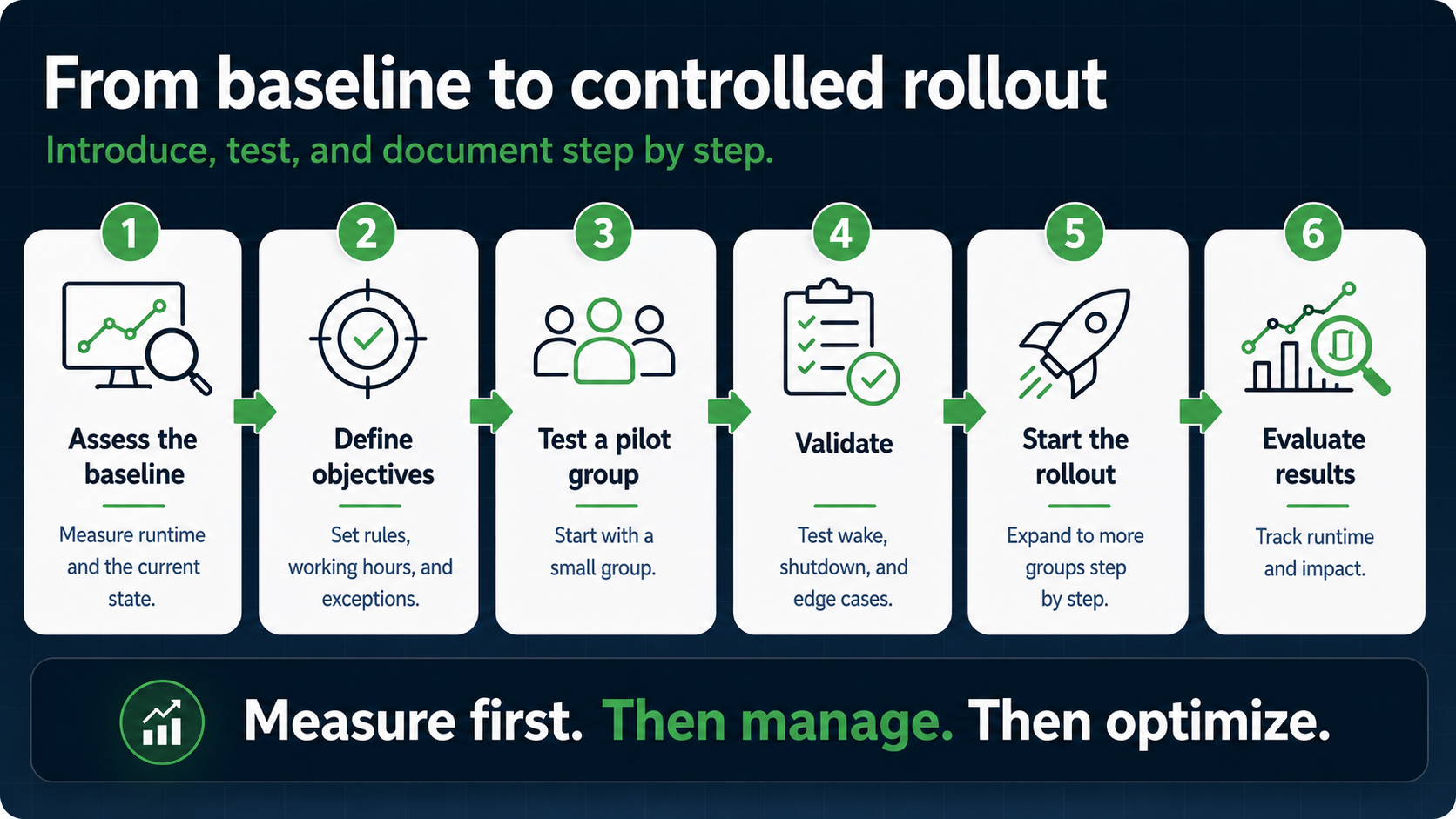
1. Measure runtime
First determine when devices actually run and how much runtime occurs outside their intended use.
2. Segment devices and users
Office PCs, notebooks, training rooms, shift systems, and special-purpose devices do not necessarily need the same policy.
3. Define protection rules
Coordinate working hours, activity signals, applications, processes, maintenance, and exceptions with the responsible teams.
4. Test a small pilot group
Validate shutdown and wake behavior first with representative devices and real working situations.
5. Test wake paths
Test firmware, network adapters, power states, routing, VLANs, and proxies for every relevant target network.
6. Measure impact and disruption
Review runtime changes, exceptions, failed actions, and support incidents before rolling the policy out more broadly.
Realistic assessment
Limits and measurement
The impact can only be assessed against the actual baseline. Device mix, previous runtime, power draw, electricity price, electricity mix, and existing policies all influence the result.
Measurement instead of a blanket figure
- record baseline runtime and the operating hours that can realistically be avoided;
- document power draw, electricity price, and the emissions factor used;
- include exceptions, failed actions, and support incidents in the assessment;
- compare calculated values with actual runtime data after rollout.
Important limitations
- Savings depend on baseline runtime, power consumption, electricity price, and usage.
- Wake-on-LAN remains dependent on hardware, firmware, drivers, and the network path.
- Overly aggressive rules can disrupt users or maintenance processes.
- Notebooks, remote systems, and special-purpose devices require their own tests and exceptions.
Potential savings should therefore not be promised as a fixed amount. The ROI calculator makes assumptions visible; actual results should then be checked against runtime and reporting data from the organization's own environment.
Transparent product context
How Auto Shutdown Manager addresses these requirements
EnviProt develops Auto Shutdown Manager. The software is designed for centrally managed PC power management in enterprises, educational institutions, and public-sector organizations, and complements existing endpoint-management tools.
Safe shutdown
Idle shutdown can evaluate multiple activity signals, protected periods, warnings, and exceptions. For Office applications, ASDM can also save unsaved documents.
Maintenance and availability
Scheduled wake processes and protected maintenance windows help make endpoints available for updates or deployments.
Wake-on-LAN in complex networks
Enterprise Wake-on-LAN and WOL proxies support controlled wake paths across subnets, VLANs, and distributed sites.
Central control and evidence
Group-based policies, central management, and reporting combine runtime control and evaluation in one product. The feature list shows the full scope.
Frequently asked questions
PC power management FAQ
What is PC power management?
PC power management encompasses rules and tools for controlling the power states of workplace PCs, notebooks, and comparable endpoints. It includes controlled shutdown, low-power states, scheduled or on-demand wake-up, and runtime analysis.
Are Windows power options sufficient in an enterprise?
Windows power options and Group Policy may be sufficient for consistent baseline settings. Additional tools become relevant when genuine idle time, open user work, different working hours, maintenance windows, Wake-on-LAN across network boundaries, and centralized reporting must be managed together.
Which is better: standby, hibernation, or shutdown?
That depends on the expected absence, required resume time, hardware, and wake requirements. Standby is suitable for fast resume, hibernation retains the session during longer breaks, and a controlled shutdown ends the operating-system session for long unused periods.
Does Wake-on-LAN work across VLANs and remote sites?
A local broadcast is normally not forwarded across router or VLAN boundaries. Remote networks require a planned delivery path, such as an authorized directed broadcast or a WOL proxy in or near the target network.
How can open documents and active users be protected?
A safe policy combines protected working hours with activity checks, exceptions, user warnings, and a defined process for open or unsaved documents. The rules should be tested with real user and application scenarios before a broad rollout.
How is the savings potential calculated?
At minimum, the calculation requires device count, avoidable runtime, average power consumption, electricity price, and the period being assessed. CO₂ values additionally depend on the emission factor used. Calculated values remain estimates and should be compared with actual runtime data after rollout.
External references
External technical references
The following references lead to external Microsoft and UEFI Forum websites:
- Microsoft Learn: System Power States
- Microsoft Learn: Modern Standby
- Microsoft Learn: Powercfg command-line options
- UEFI Forum: ACPI Definition of Terms
Next step
Review requirements, calculate the potential, and test in your own network.
The product overview shows how Auto Shutdown Manager combines shutdown, Wake-on-LAN, central management, and reporting. The ROI calculator and 45-day Enterprise Trial let you test the assumptions in your own environment.