 DE
DE  EN
EN 
Auto Shutdown Manager · Remote Operations
Remote endpoint power control for managed IT operations
Give administrators one central way to shut down, restart, log off, hibernate, sleep or wake managed PCs — from planned fleet operations to direct support intervention and controlled remote availability.
Operational fit
PCs should not run 24/7 — but they still need to be available
Enterprise power management fails when it is treated as a single Windows setting, a one-off Wake-on-LAN packet or a fragile script. IT needs an operating process that decides when a PC may safely power down, when it must be available again, and how this fits support, maintenance, remote access and savings goals.
Windows, GPO, SCCM/MCM, Intune and scripts
These tools remain important for endpoint policy, deployment, compliance and administration. But they usually solve only parts of the power-state process: baseline settings, task execution, deployment timing or individual scripted actions.
Auto Shutdown Manager
ASDM adds the dedicated operating layer: safe shutdown rules, central remote actions, scheduled wake-up, Wake-on-LAN infrastructure, user self-service paths and reporting for energy, cost and CO₂ validation.
Central control
What admins can do with central power-state control
The main value is not managing one PC. The value is giving IT a simple central control point for endpoint availability across groups, sites, rooms, OUs, maintenance windows and support cases — without desk-by-desk work or undocumented one-off scripts.
Prepare maintenance windows
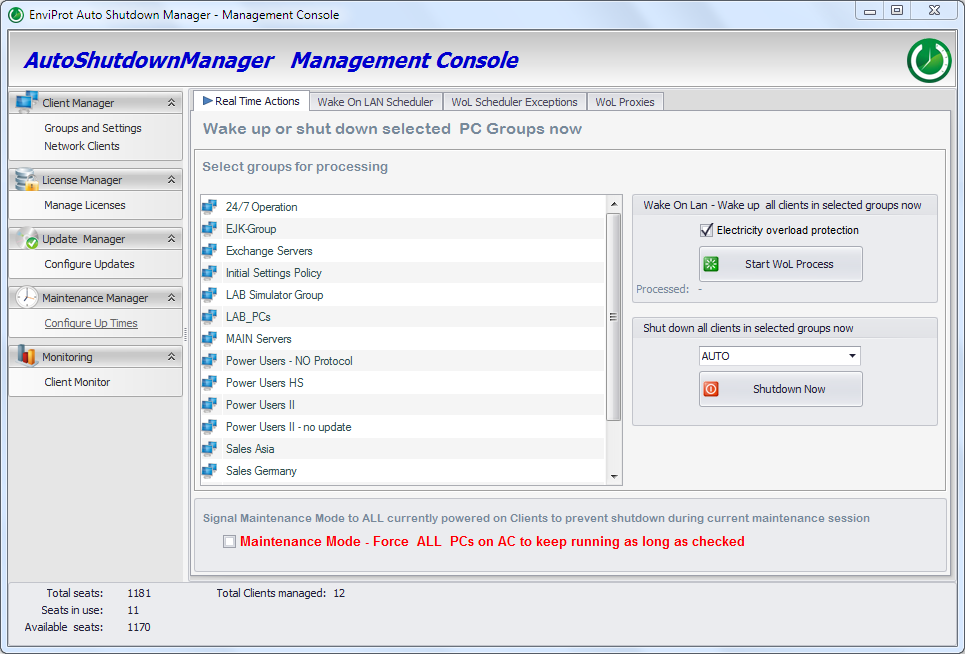
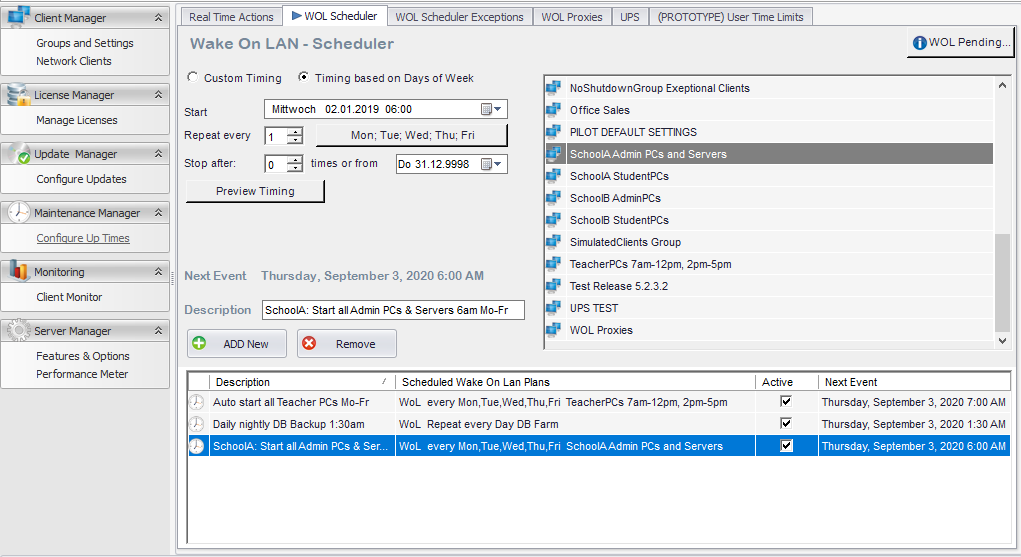
Wake managed PCs before patching, inventory, backups or administrative checks so endpoint management tools can do their work.
Run group and site actions
Apply shutdown, restart, wake-up or logoff actions to selected groups, locations, departments, OUs or test sets from one managed workflow.
Support without walking to the desk
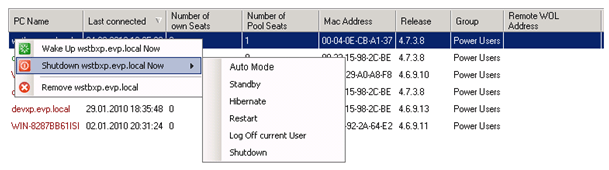
Use direct administrative actions when a specific endpoint must be restarted, logged off, powered down or woken for support or troubleshooting.
Reduce unnecessary runtime
Keep machines available when required, but avoid the default habit of leaving entire fleets powered on overnight.
Control remote availability
Wake selected office PCs for valid remote-access or maintenance scenarios without keeping entire fleets powered on permanently.
Keep the process auditable
Connect power actions to central management, reporting and ROI validation instead of undocumented manual work.
Operations workflow
From direct admin action to scheduled fleet availability
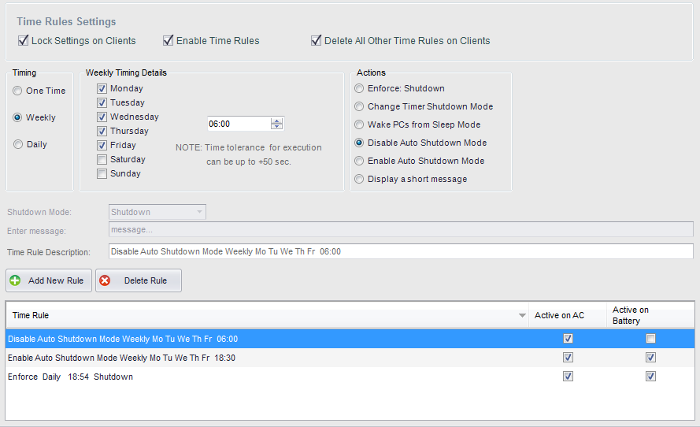
The goal is not to send more commands. The goal is to make endpoint power state predictable for users, IT operations, maintenance windows and energy-saving policies.
Wake-on-WAN Tool
Use the WoW Tool when a remote client must be woken on demand
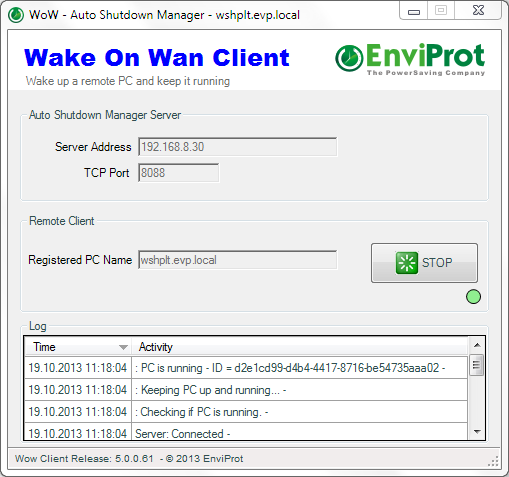
The Wake-on-WAN Tool is the special path for cases where a remote source PC needs to ask the Auto Shutdown Manager Server to wake a registered client and keep it running as long as necessary.
Typical WoW scenarios
- Home-office access to an assigned office PC.
- Overnight maintenance access to a display PC, such as in airports or shop windows.
- Rarely turned-on remote clients that must be available temporarily.
How the request is handled
The WoW request is sent to the ASDM Server. The final WOL-based wake command is sent from the server, not directly from the WoW client. The source PC and the target PC must both be valid ASDM clients of the server.
Choose by operational goal
Use the right ASDM capability for the job
Start from the operational goal and choose the ASDM capability that fits the situation: central admin control, routed wake-up, delegated self-service, special remote-client wake-up or savings validation.
Central admin operations
Use remote operations for shutdown, restart, logoff, sleep, hibernate, wake-up, scheduled actions and support intervention.
Enterprise Wake-on-LAN
Use the Wake-on-LAN infrastructure when the question is network delivery, WOL proxies, routed wake-up across VLANs, subnets or sites.
WOL Portals
Use WOL Portals for regular user self-service when authorized users should wake assigned office PCs under policy.
WoW Tool
Use the WoW Tool for specific remote-client scenarios such as home-office access to an office PC or temporary access to a rarely turned-on remote client.
ROI Calculator
Use the ROI Calculator when the question is business case, energy savings, cost savings and CO₂ estimate.
Enterprise Trial
Validate shutdown behavior, wake reliability, maintenance windows and user exceptions in your own environment.
Availability first
Power management becomes credible when availability is solved too
Most organizations can imagine saving energy by turning PCs off. The harder part is doing it without disrupting users, maintenance, remote access or endpoint management. That is why ASDM combines shutdown rules, wake-up, portals, central management and reporting.
Safer shutdown decisions
Use operating rules, schedules and exceptions so power-down is not just a blind command.
Reliable availability
Wake systems for users, maintenance or IT operations where hardware and network conditions allow it.
Measurable business case
Estimate and validate potential energy, cost and CO₂ savings instead of relying on assumptions.
Frequently asked questions
Remote endpoint power control questions
Short answers for IT teams evaluating ASDM as an operational complement to existing endpoint management.
Is this mainly for controlling one PC?
No. Single-PC actions are useful for helpdesk and troubleshooting, but the main value is central control over groups, schedules, sites, OUs, maintenance preparation and operational policies.
How does this complement SCCM/MCM, Intune or GPO?
Those tools remain important for endpoint management, deployment and baseline policy. ASDM adds the dedicated power-management layer: safe shutdown rules, scheduled wake-up, Wake-on-LAN infrastructure, portals and savings reporting.
How does ASDM avoid unsafe shutdowns?
ASDM should be configured with the organization’s operating rules: idle detection, user sessions, time rules, maintenance windows and exceptions. The objective is controlled shutdown, not blind power-off commands.
Does remote shutdown force applications to close?
When a remote shutdown is executed, running applications are closed. ASDM can be configured to save open documents before shutdown as part of the shutdown workflow, subject to the application behavior and the configured policy.
Can users wake their assigned office PCs?
Yes, where the organization deploys that workflow. For regular user self-service, ASDM WOL Portals are the preferred approach because access can be tied to assigned PCs and policy-controlled wake-up.
When should the WoW Tool be used?
Use the WoW Tool for specific remote-client scenarios, such as home-office access to an assigned office PC, overnight maintenance of a display PC or another rarely turned-on client that must be available temporarily. The request goes through the ASDM Server.
How should we evaluate this safely?
Start with a limited pilot: one department, one room, one site or a defined test group. Validate shutdown behavior, wake reliability, maintenance windows, user exceptions and savings assumptions in your own environment.
Shut down safely. Wake reliably. Prove the savings.
Use the Enterprise trial to validate central remote operations, scheduled wake-up, WoW/WOL Portal scenarios and savings estimates with your own endpoint policies and network design.